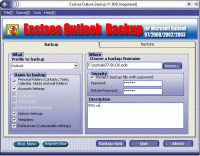
Eastsea Outlook Backup is a backup and restore tool for the Microsoft Outlook. It allows you to save Personal Folders, Contacts, Personal Address Book, Mail folders, Mail accounts, Message rules, signatures, stationery, tasks, notes, calendar, etc.
Microsoft Outlook is one of the most important applications on your system. Is your data safe?
Eastsea Outlook Backup is a backup and restore tool for the Microsoft Outlook. It allows you to save Personal Folders, Contacts, Personal Address Book, Mail folders, Mail accounts, Message rules, signatures, stationery, tasks, notes, calendar, Templates, and all personal settings.
Eastsea Outlook Backup allows you to backup data on one computer and restore it to another one. This program is easy to use and has a simplified user interface, very useful for beginners.
Backup and restore your Outlook data:
Personal Folders (Message Rules, Contacts, Tasks, Calendar, Notes and mail folders, etc.)
Accounts Settings
Signatures
Stationeries
Personal Address Book
Options Settings
Templates
Preferences (Customizable settings)
Eastsea Outlook Backup has the following key features:
Eastsea Outlook Backup will easily move mail folders between two machines.
You may select which items are to be saved and restored.
Automatic Zip compression of backup files.
Backup to DVD+R, DVD+RW, DVD-R, DVD-RW, DVD-RAM, CD-R, CD-RW.
Add Comment for Backup archives.
An automatic backup Task scheduler enables you to start the backup process at any convenient date and time, and it allows you to schedule more than one backup task.
Easy-to-use simple-style interface
The backup data can be password protected by specifying a password to it.
You also can backup the data on one computer and restore it to another computer, so the software is not just a backup utility, but also a synchronization tool.
Benefits:
Protect your emails from a system crash.
Restore your Outlook after a system formatting.
Store backup files on a reliable medium like CDR.
Move Ms Outlook data between computers.Requirements: MS Outlook 2000, 2002(XP), 2003, 2007 or 2010. Operating system: Win2000,Win7 x32,WinServer,WinVista,WinXP Release notes: New Release
BestSync 2008 is a professional utility for sync and backup file between net drive, shared folder, FTP server and USB removable media with filtering, encryption etc advanced features.
Price: $ 15, Rating: 10, Downloads: 198 Download
File Sync is a very fast and robust files and folders synchronization software for Windows. It automates the replication of data between desktop PCs, laptops, USB drives and more.
Price: $39.95, Rating: 10, Downloads: 165 Download
Products for users have the account of MicroSoft windows live skydrive service. This is tool to do realtime backup, one-click restoration, auto-save, management without any user's interaction. Auto-save every 3 minute of current working file.
Price: $0, Rating: 5, Downloads: 134 Download
Genie Timeline is a time machine backup software for Windows that automatically and continuously backs up music, videos, photos, files and folders on your machine with little or no user intervention bringing unique simplicity to file backup.
Price: $34.95, Rating: 0, Downloads: 127 Download
Asoftech Photo Recovery is an easy to use data recovery software available to restore your photos, music and videos from local PC and removable devices. No matter multimedia files have been deleted accidently, or memory card has been formatted.
Price: $0, Rating: 10, Downloads: 126 Download
User Rating
Rating:2.2 out of
5 Based on13 ratings.
13 user reviews.

 Eastsea Outlook Backup 2.60 details